
Litchi for DJI Drones
VC Technology Ltd · App ID: 1059218666
Downloads / mo
3.2K
Range 1.3K–8K
Revenue / mo
$61.7K
Range $24.7K – $154.2K
RPD
$19.29
Revenue per download
Avg. DAU
9.4K
Daily actives
Time Spent
11 min
Per user / day (est.)
Session Count
651.5K
Monthly (est.)
Category Ranking
100+
Photo & Video · US Today
Top Countries
US · India · Brazil
By est. downloads share
Downloads Trend
34.3K12-mo total
Monthly avg 2.9K
Revenue Trend
$661.1K12-mo total
Peak Apr ($64.1K) · amber bar = best month
Release Details
- Current Version
- 2.15.9
- Last Updated
- 4/2/2026
- Release Date
- 12/21/2015
- Minimum OS
- 12.4
- File Size
- 303.1 MB
- Content Rating
- 12+
- Languages
- CS, DA, NL, EN, FI, FR +17
Description
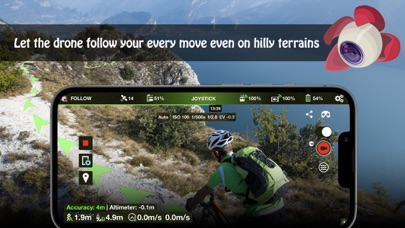
Unlock the full potential of your DJI drone with Litchi, everyone's favorite flight app With over 5000 successful daily flights, Litchi is the most trusted flight app for your DJI drone Compatible with: DJI Mini 2, Mini SE (version 1 only), Air 2S, Mavic Mini 1, Mavic Air 2, Mavic 2 Zoom/Pro, Mavic Air/Pro, Phantom 4 Normal/Advanced/Pro/ProV2, Phantom 3 Standard/4K/Advanced/Professional, Inspire 1 X3/Z3/Pro/RAW, Inspire 2, Spark This app is *NOT* compatible with the latest DJI drones (Mini 3, Mini 4, Mini 5, Mavic 3 Enterprise, Matrice 4 etc). For these, you will need to use Litchi Pilot instead Purchase Litchi today and get a 30% off coupon towards your Airdata.com subscription, exclusive to Litchi pilots, refer to https://flylitchi.com/airdata for more info Feature highlights: - Waypoint mode Whether you are a professional or beginner, Litchi offers the most intuitive yet powerful waypoint engine. Our waypoint planner is available on all platforms including PC/Mac with seamless flight plans syncing across all your devices - Panorama mode Easily shoot horizontal, vertical and 360 spherical panoramas. And when you're done shooting, stitch on-the-go up to 130 megapixels panoramas on iPhone (up to 220MP on iPad Pro). Say goodbye to using additional expensive PC/Mac stitching software! - Track mode With Litchi's Track mode, your DJI drone now understands what it sees. Using state of the art computer vision algorithms, Litchi keeps your selection perfectly framed while you fly the drone. Don't want to fly manually? That's ok too, start an autonomous Orbit or Follow and watch Litchi take care of everything - Follow mode The drone follows your every move using the mobile device GPS and altitude sensors - VR mode By harnessing the power of your mobile phone, the Virtual Reality mode brings you the most immersive FPV experience. Watch your autonomous flight in VR mode, or fly manually for added thrills. Requires goggles sold separately - Focus mode Litchi assists you by taking control of both the gimbal and the drone's yaw axis, so you can concentrate on horizontal movements And much more including... - Orbit mode to circle around a subject with advanced settings and real time controls - Livestream your drone's video feed to Facebook or to a RTMP server - Stream the video feed to a nearby device running the Litchi Vue app - Custom RC keys functions allow you to create flight plans as you fly them and much more - Human readable flight logs (CSV format), which can be automatically uploaded to Airdata UAV - Voice feedback for important warnings - Automatic video recording - Support for bluetooth controllers Visit our website for more information: https://flylitchi.com How to connect Litchi to your drone: https://www.flylitchi.com/help Make sure to check out the Litchi Hub at https://hub.flylitchi.com
Screenshots(6)
View on store ↗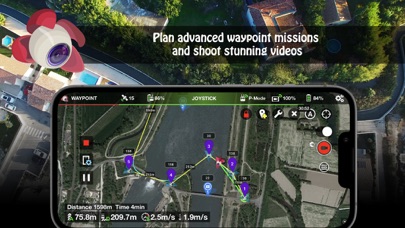




Ratings
4.6 / 5
2,248 ratings
- 5 ★76%
- 4 ★11%
- 3 ★5%
- 2 ★4%
- 1 ★4%
Recent Reviews
- ★★★★★Raging Skies
Superb Reliability
No worries as usual. Litchi rules the drone skies
- ★★★★★Tsimoka
Dji Mini SE
i can’t use the Follow mode or the track Mode….is there any update version?
- ★★★★★Sleep 423
Does not work on my dji mini 2se
No good
- ★★★★★BlueSpectrumz
Litchi Hub beta Waypoint Mission sims in Google Earth
Using the new Litchi Hub beta, for creating/managing waypoint missions, then simulating them in Google Earth, is really nice. This is a great improvement. I flew a 95 foot mission, on our neighborhood’s private road, with the camera pointing down, then at a POI, and the Google Earth SIM matched the actual drone video quite accurately.
- ★★★★★Gabrielcedeno50
Recommend
100% recommend
- ★★★★★Aande_1
Dangerous and irresponsible
Litchi does not work as it is supposed to and they take no responsibility for it. It is a very dangerous app that overrides manual controls when a mission is in jeopardy. I would not use if you value your safety and the safety of those around you.
- ★★★★★vicbendecido
Pregunta
Como usar litchi con el mini 4 pro
- ★★★★★Jayprint
Wow
Love it
- ★★★★★joydeepdg
DOES NOT SUPPORT DJI MINI 2 SE
Bought with 26 USD.Tried my level best to connect with my drone.for that even deleted my Dji fly app.But it would not connect. Every software and firmware updated. Dji mini 2 SE. NOT FOR MINI 2 SE. THEY R GIVING WRONG INFORMATION TO CLIENTS. Disappointing. Asked for a refund. SHOULD BE REMOVED FROM APP STORE FOR HARRASSMENT OF CLIENT’S.
- ★★★★★MatthewMorgan78255
Fantastic preprogrammed routes! But…
I cannot believe that it took me a year of owning my drone to discover this app. Using the waypoint feature of the DJI go app is bananas for what I do. I need to plan a course out in advance and then run it. Unfortunately, the Litchi app Requires the drone to be within range of the transmitter for gimbal settings to work. Found out the hard way. I am running this on a ranch and at times the drone is out of range of the transmitter was ignoring my gimbal settings. Grrr.