
Audyssey MultEQ Editor app
D&M Holdings · App ID: 1210584625
Downloads / mo
331
Range 132–828
Revenue / mo
$5K
Range $2K – $12.4K
RPD
$14.99
Revenue per download
Avg. DAU
964
Daily actives
Time Spent
41 min
Per user / day (est.)
Session Count
66.5K
Monthly (est.)
Category Ranking
100+
Music · US Today
Top Countries
US · India · Brazil
By est. downloads share
Downloads Trend
3.4K12-mo total
Monthly avg 285.9
Revenue Trend
$51.4K12-mo total
Peak Jun ($5.5K) · amber bar = best month
Release Details
- Current Version
- 1.14.1
- Last Updated
- 5/15/2026
- Release Date
- 4/4/2017
- Minimum OS
- 12.0
- File Size
- 49.4 MB
- Content Rating
- 4+
- Languages
- NL, EN, FR, DE, IT, JA +5
Description
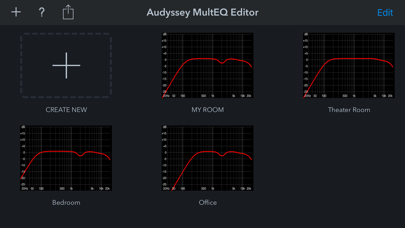
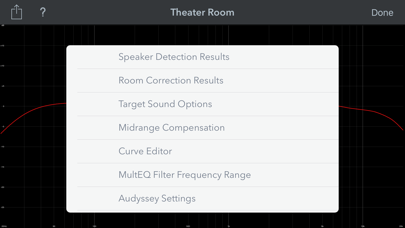
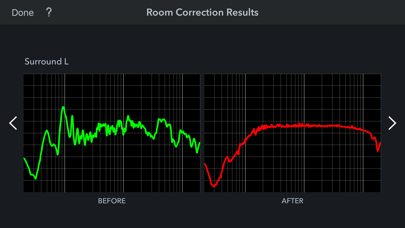
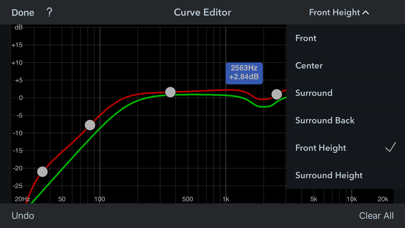
The latest Denon Marantz audio video products use Audyssey MultEQ for simple, accurate set-up calibration of your system to the room in which it’s used. But, now you can go further with the Audyssey MultEQ Editor app, going ‘under the hood’ to view and adjust settings for detailed tuning – allowing you to customize the sound more precisely to the specific problems in your room, and tailor the sound to your personal preferences. With this comprehensive app, you can harness the power of Audyssey MultEQ to take total control of the way your home cinema sounds. This app will allow you to: •View the speaker detection results, to check correct installation •View before and after results of the Audyssey calibration, making it easy to identify room problems. •Edit the Audyssey target curve for each channel pair to suit your tastes •Adjust the overall EQ frequency rolloff for each channel pair •Switch between 2 high frequency rolloff target curves •Enable/Disable midrange compensation to make the sound brighter or smoother •Save and load calibration results This app requires specific hardware in your product to function: please double-check that your Denon or Marantz model is supported - see list below - before purchasing. •Multi-Language Support (English, French, German, Spanish, Italian, Dutch, Swedish, Polish, Russian, Japanese and Simplified Chinese. The OS language setting is automatically detected; when not available, English is selected.) Compatible models: (Product availability varies depending on regions.) Denon AV Receiver: AVR-X6300H, AVR-X4300H, AVR-X3300W, AVR-X2300W, AVR-X1300W, AVR-S920W, AVR-S720W, AVR-S730H, AVR-S930H, AVR-X1400H, AVR-X2400H, AVR-X3400H, AVR-X4400H, AVR-X6400H, AVR-X8500H, AVR-S740H, AVR-S940H, AVR-X1500H, AVR-X2500H, AVR-X3500H, AVR-X4500H, AVR-X6500H, AVR-X1600H, AVR-X2600H, AVR-X3600H, AVR-S750H, AVR-S950H, AVR-A110, AVR-X6700H, AVR-X4700H, AVR-X3700H, AVR-X2700H, AVR-S960H, AVR-X8500HA, AVR-X1700H, AVR-S760H, AVR-A1H, AVR-X4800H, AVR-X3800H, AVR-X2800H, AVR-S970H, AVR-X1800H, AVR-S770H, AVR-X6800H, AVR-A10H, AVR-S980H, AVR-X2900H, AVR-X3900H Marantz AV Receiver: AV7703, SR7011, SR6011, SR5011, NR1607, NR1608, SR5012, SR6012, SR7012, SR8012, AV7704, AV8805, NR1609, SR5013, SR6013, SR7013, AV7705, NR1710, SR5014, SR6014, SR8015, SR7015, SR6015, SR5015, NR1711, AV7706, AV8805A, AV 10, CINEMA30, CINEMA 40, CINEMA 50, CINEMA 60, CINEMA 70s, AV 20, AV 30 Not compatible with Denon and Marantz models other than those listed above.
Screenshots(5)
View on store ↗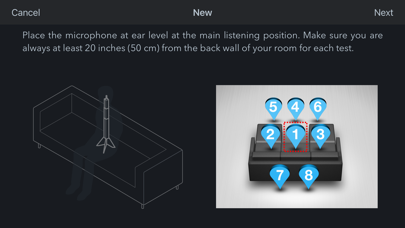
Ratings
3.0 / 5
204 ratings
- 5 ★21%
- 4 ★33%
- 3 ★15%
- 2 ★12%
- 1 ★20%
Recent Reviews
- ★★★★★Hornblowr
Not needed
I my excitement setting up my new Denon receiver, I downloaded this app. It’s not worth the 20 bucks and I put in for a refund with Apple.
- ★★★★★I love music😉
👍👍👍
Thanks to the developers of this great app! The sound on my denon x4800 receiver has become much better.
- ★★★★★lacroixvc
Potential but must fix frustrating design
Need to make it much much easier to adjust the curve editor. Very hard to add precise points and modify points with a touch screen on an iPhone. It would be much easier to enter precise values into a field than trying to drag a point into exact spot and then having to drag it into the exact spot again for each speaker. There should also be an option to replicate changes across each speaker. I have spent hours trying to manually edit the curve editor and a simpler UX with edit boxes could have reduced it to minutes. The poor UX overshadows a potentially great app!
- ★★★★★navid0308
Works!
After several buggy releases, happy to report that the latest version as of today (1.13.6) seems to work as expected. One minor oddity is that the subwoofer “after” curves seems to be a bit more jagged compared to the speaker curves. I wonder if it affects EQ, but no real way to tell.
- ★★★★★Jesusfromjesus
Scam
The app itself is horrendous to look at. Pathetic for “hi-fi” companies to tout this as anything to be frank. Not even worth the 20$. But the most egregious thing is the fact that they actively update their app to prevent users from using free software to calibrate your systems. They want you to use far inferior and more expensive software so you stay under their thumb. Pathetic and I genuinely pray on the downfall of these companies who actively push for 1000$ price tags on room treatment software. In all honesty, these people need to be fired and on the streets. Trying to nickel and dime customers who already pay thousands is literally insane. Getting a refund for this scam of an app that quite literally does nothing better than what your receiver already does.
- ★★★★★NoStoppin
Basics good, user experience bad
I’ve used this app quite a bit since getting my new Denon. Works great if you live in a perfectly quiet place. It lacks one key element during the testing : being able to repeat the last test on EVERY STEP. It allows RE-do on some, not all steps. NOT on say, the 7th and 8th step. So, so close to being through it all then a random siren, honk, or other loud noise ruins the run. The Denon receiver DOES allow each step to be redone, so please dear app devs, include the ability to “repeat last” on every step.
- ★★★★★Julesmoke
Won’t find Marantz NR1510
Exact same network, will not find AVR. I’ve updated and reset everything multiple times. Confirmed IP via router access. Can’t find AVR at all.
- ★★★★★flmiami
Stagnant for years. It needs to be updated and improved
It is useful and easy to use, but it has remained stagnant for years. It needs to be updated and improved beyond adding compatibility with new AVRs. For example, a few usability wish list items… Show actual post calibration measurements, not just predicted results. Show frequency response curves after just the first set of measurements (instead of min 3 sets) to speed up the optimal placement of speakers, subs and MLP, before running the 3 to 8 measurements once the optimal positions have been determined. Allow to measure the frequency response of each speaker and subwoofer individually and by groups.
- ★★★★★Kneeler999
Does what it says on the tin
No real complaints - works as I expected and a bit easier to use over the reciever’s built in. The positions to measure are a bit clearer and the distances measured seem right - the reciever showed larger values. Adjusting the curves and mid correction is truly useful and makes it hard to quibble about the $20 but on a $3500 purchase it should be included so one star off for that
- ★★★★★Create nickname lololol oil
Sub roll off
The latest update now causes the low bass to be rolled off! Please remove this “feature” immediately. No one wants their 20hz bass being rolled off! The whole point of buying nice subwoofers is the deep bass impact!