
Camera M - Pro Manual Camera
bxb · App ID: 1239098425
Downloads / mo
2.3K
Range 935–5.8K
Revenue / mo
$17.3K
Range $6.9K – $43.2K
RPD
$7.39
Revenue per download
Avg. DAU
5.8K
Daily actives
Time Spent
11 min
Per user / day (est.)
Session Count
403.1K
Monthly (est.)
Category Ranking
100+
Photo & Video · US Today
Top Countries
US · India · Brazil
By est. downloads share
Downloads Trend
24.5K12-mo total
Monthly avg 2K
Revenue Trend
$181.2K12-mo total
Peak Mar ($17K) · amber bar = best month
Release Details
- Current Version
- 9.3.1
- Last Updated
- 6/4/2026
- Release Date
- 8/3/2017
- Minimum OS
- 16
- File Size
- 29.2 MB
- Content Rating
- 4+
- Languages
- EN, DE, JA, ZH, ES
Description
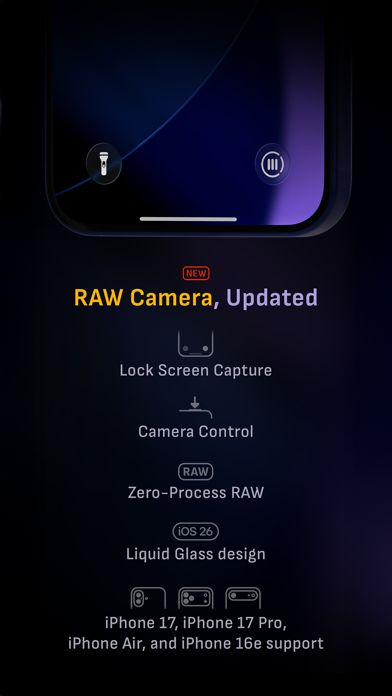
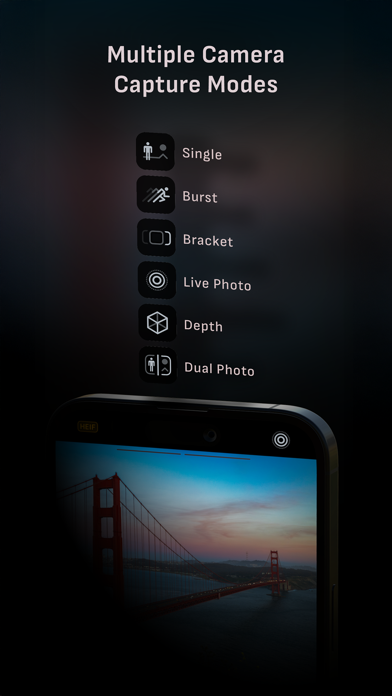
Camera M is a professional manual camera app designed to do one thing exceptionally well — help you capture beautiful photos at the highest possible quality with powerful, precise manual controls akin to a DSLR. HIGHLIGHTS • Fluid gesture-based native manual controls with Fine-Tuning feature • iOS 26 optimization with Liquid Glass design • Zero-process RAW support for the most natural look • Max Image Processing to ensure the absolute best image quality • ProRAW*, RAW, HEIF, JPEG, TIFF, and PNG image formats • Single, Burst, Timer, Live, Depth*, Dual Photo*, and Bracket shooting modes • Triple Photo mode with simultaneous ultra-wide, wide-angle, and telephoto camera capture* • Minimum focus distance display for macro photography • Intelligent Focus Tracking • Focus Peaking and 4x magnifier loupe with panning function • Live RGB and RGB luminance histograms • Manual gray card calibration • Great widgets for photography • Darkroom integration CAMERA CONTROLS – Manual focus – Macro and Scene focus presets – Exposure bias – Manual ISO & exposure duration adjustments – ISO & exposure duration semi-priority modes – Manual white balance temperature and tint – White balance presets – Gray card white balance calibration – Auto, on, and off flash modes – Manual torch brightness level – Manual switching between Ultra Wide, Wide, and Telephoto cameras* – Digital pinch zoom with 10x range – Camera Control support for all manual controls – Lock Screen camera capture support IMAGE FORMATS – Apple ProRAW* – RAW with stabilization – HEIF with optional minimum compression – JPEG with optional minimum compression – TIFF – PNG – Live Photo – P3 wide color support* SHOOTING MODES – Single – Burst – Timer – Depth* – Dual/Triple Photo* – Live Photo* – Bracket TOOLS – Exposure offset gauge – Intelligent Focus Tracking – Live focus peaking assistant – 4x magnifier loupe with panning function – Minimum focus distance display – Live RGB and RGB luminance histograms – Highlight & shadow alert display – Horizon level with available pitch tracking and flat options – Rule of Thirds, Golden Ratio, Quadrant, and Square grids – Siri Shortcuts and App Shortcuts – Detailed camera specifications display with PDF export MAX IMAGE PROCESSING – Deep Fusion and Smart HDR support for iPhone 11 and later. – Ensures maximum image quality with better noise reduction, image stabilization, and additional processing for all other iPhones and iPads ZERO-PROCESS RAW – Capture standard RAW files with no extra processing PHOTO LIBRARY – Summarized and full EXIF metadata display – Location data display with compass and elevation – RGB and RGB luminance histogram displays – Access to all photo albums and folders WIDGETS – Home Screen: Golden Hour, EXIF, and Cameras – Lock Screen: Cameras and Golden Hour – Control Center: Focus, exposure, and white balance APPLE WATCH SUPPORT – Shutter button control – Sunrise, sunset, and Golden Hour display with sun position indicator ERGONOMICS – True one-handed control on all iPhones – An uncompromising approach to user experience in landscape orientation ACCESSIBILITY – Dynamic Type support – Bold Text support – Increase Contrast support TECHNOLOGY Camera M is powered exclusively by native APIs and frameworks. There are absolutely no dependencies on any outside sources. This makes it responsive and efficient — from its small download size to its quick app launch times. We hope you enjoy taking amazing photos with Camera M! Website: www.camera-m.com User manual: www.camera-m.com/manual Get in touch: contact@camera-m.com Follow us: @CameraMApp #CameraM * These features are available on supported devices only. * Depth capture for selfies requires an iPhone or an iPad with a TrueDepth camera system. * Apple ProRAW capture requires iPhone 12 Pro or later. * For more information on device and feature compatibility: www.camera-m.com/compatibility
Screenshots(9)
View on store ↗




Ratings
4.5 / 5
1,391 ratings
- 5 ★80%
- 4 ★8%
- 3 ★4%
- 2 ★3%
- 1 ★5%
Recent Reviews
- ★★★★★Ggtr27
Manual focus doesn’t work
The sole reason I paid for this app was so I could set focus to infinity when taking pictures through glass etc. However, when I set focus to infinity (while leaving all other settings on auto), the pictures come out unusably blurry
- ★★★★★Skym90s
Used to be my go to camera app
This app used to be my daily camera app until the last few updates. I’m not joking I take two pictures… Both in manual mode and both the same exact iso and same exact shutter speed only difference is I shot the first in SINGLE and the second in LIVE and you’d think the exposure and brightness would be pretty similar well it’s significantly different. Enough to the point where I can no longer shoot in single mode because single mode RUINS the photo. Please fix the single mode when in manual. It’s the exposure and brightness that’s wayy off than where it should be. Granted it looks totally fine before taking the shot and then guess what ? After taking the shot it looks way different any ruined. There’s been many times where i took important photos and had to delete all of them because they were ruined.
- ★★★★★The Airbrusher
The Airbrusher
Keeps getting better 👍
- ★★★★★Anal.Andy
Wow!
Smooth, thoughtfully designed. The tool I utilize most often day to day. Second nature now … Thank you!!
- ★★★★★Quinton sp
Burst mode broken
Purchased to use burst mode, ideally with apple watch. Burst mode does not work outright even in app.
- ★★★★★Bob Lefvits
Updated: Best camera app around
Update: Thanks for the response! You helped solve my problem, had to add the Siri shortcut through the Camera M app for a shortcut with the “Switch to Telephoto Camera” action to appear. It’s not available as an action to add to shortcuts otherwise which caused my confusion as it seemed like it should be given the widget for it and since there are other Camera M actions available without adding Siri shortcuts so that may be something for the devs to look at. I had been using the Camera M control button to replace the normal camera control on the lock screen/pull down control center, but wanted to open directly to the telephoto camera and exposure screen, which I can now do by adding the Siri shortcuts for both, pasting the action from one into the other, and replacing the lock screen/control center button with it. Really speeds things up, important when there’s a moment you want to capture, and doesn’t require Siri, a widget, or an automation. Thanks! (Would be cool to have a shortcut/shortcut action to set a particular ISO too since I almost always use a very low one to reduce noise, part of why I love this app is being able to control ISO, but that’s probably a pretty niche request)
- ★★★★★PyroAVR
The “enjoying Camera M” popup is very annoying
I’m trying to take a picture with manual settings. I don’t need to be asked every two seconds if I like the app. Now I like it a lot less than I did.
- ★★★★★RYOkEkEN
FEBRUARY 2026 still:DATA NOT COLLECTED! that's what you should know first
EXCELLENT CAMERA! can other apps say the same? love it had it for years,i own it no subscription loooove it! way better than the famous competition pushed by some podcasters. if you DON'T LIKE HALIDE, then this app is for you 😊 if i was the developer i'd lean heavy on "DATA NOT COLLECTED"
- ★★★★★ghuppay
Useless
Doesn’t do anything and I think I got charged for it…shutter speed is the same as the phone. You do not need this app with an IPhone.
- ★★★★★TheYechGuy
Still Professional Photo Dedicated
As a professional photographer who sold all his mirrorless pro gear to go strictly mobile, this app deserves to be on top of the stack of shooting apps. I’ve tried the highest reviewed and chose now to use the best performing!