
Downloads / mo
83
Range 33–208
Revenue / mo
$315
Range $125 – $789
RPD
$3.79
Revenue per download
Avg. DAU
232
Daily actives
Time Spent
41 min
Per user / day (est.)
Session Count
16K
Monthly (est.)
Category Ranking
100+
Music · US Today
Top Countries
US · India · Brazil
By est. downloads share
Downloads Trend
91112-mo total
Monthly avg 75.9
Revenue Trend
$3.5K12-mo total
Peak May ($338) · amber bar = best month
Release Details
- Current Version
- 1.03
- Last Updated
- 9/23/2019
- Release Date
- 9/7/2017
- Minimum OS
- 8.0
- File Size
- 55.3 MB
- Content Rating
- 4+
Description
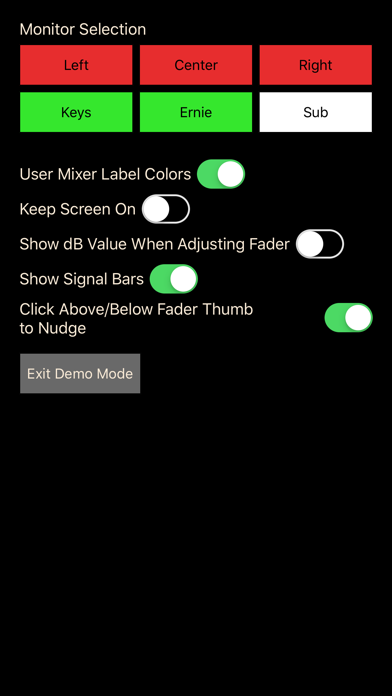
XAir Monitor Mixer is a personal monitor mixer for select Behringer and Midas digital mixers. It allows each musician on stage to choose exactly what they hear in their monitor without affecting (or being able to affect, even by accident) the band's main mix. XAir Monitor Mixer supports the Behringer X18, XR18, XR16, XR12, and the Midas MR18 and MR12. XAir Monitor Mixer deliberately does not include controls that would allow a musician on stage to accidentally mute channels or otherwise alter the main mix. Usage: 1. Connect to the same WiFi network as the XR18. In most cases, this should be enough for the app to find your mixer. However, if your sound engineer has changed the default address of the mixer, you'll have to enter that address in the app's connection screen. 2. Choose which monitor you want to mix. If your sound engineer hasn't named these in a way that makes it obvious which is yours, ask him which is yours. 3. Mix away. :) If you have feedback, suggestions, or bug reports, please visit the forums at xairmonitormixer.tetzfiles.com or send an email to xairmonitormixer@tetzfiles.com. Note: support for mixers other than XR18 was recently added. If you run into any issues, please let us know. Ensuring proper compatibility with all supported mixers is our top priority.
Screenshots(2)
View on store ↗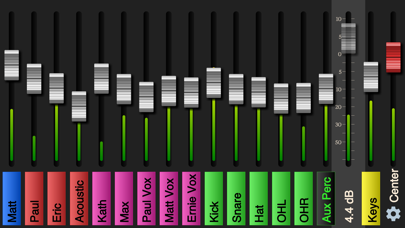
Ratings
2.4 / 5
49 ratings
- 5 ★20%
- 4 ★30%
- 3 ★14%
- 2 ★12%
- 1 ★24%
Recent Reviews
- ★★★★★Fsuenaga
Scam
Does Not work pls give money back
- ★★★★★Mad drumz
Don’t waste your money
This app won’t connect to Xair 99% of the time. Yes, I’m on the xair router.
- ★★★★★Big green 052
So far, so good
I was able to connect with the external wifi but I had to make sure the IP address was correct. For some reason it was automatically trying to connect to an IP address that was off by one digit. Once I noticed it and made the correction it connected right away
- ★★★★★Tony CAM
No me gusta
Se cierra sola y o poner en negro
- ★★★★★Chino 1999
Cost
Why paying for a product i already purchase
- ★★★★★outtaideas2200
Review
I paid for the App. Gig after gig, I was not able to connect to the mixer. Big disappointment.
- ★★★★★beatBob
Not connecting to external
App is not connecting to our external router. It does connect to Xair 18 internal router. I see this may be a common issue from other reviews. Yes IP address is correct. Is there a fix for this? Hate to pay for something that we can’t use.
- ★★★★★Name the name 1222
Don’t spend the money
Complete garbage
- ★★★★★Jasbas
Update needed
With the current iOS, I need to delete and redownload the app at every gig. It worked ok before. Kind of a pain to use now.
- ★★★★★Leadguitar69
Works fine
This work fine with an external router as long as you create a network and everybody logs into that network. Getting six people on all the time sometimes a challenge, but for five people it works fine.