
Hondata
Alphabit Software Inc. · App ID: 1360947687
Downloads / mo
3.4K
Range 1.4K–8.5K
Revenue / mo
$19.3K
Range $7.7K – $48.3K
RPD
$5.69
Revenue per download
Avg. DAU
3.4K
Daily actives
Time Spent
11 min
Per user / day (est.)
Session Count
236.3K
Monthly (est.)
Category Ranking
100+
Utilities · US Today
Top Countries
US · India · Brazil
By est. downloads share
Downloads Trend
34.8K12-mo total
Monthly avg 2.9K
Revenue Trend
$198K12-mo total
Peak Jun ($21.5K) · amber bar = best month
Release Details
- Current Version
- 1.8.4
- Last Updated
- 7/1/2026
- Release Date
- 4/22/2019
- Minimum OS
- 13.0
- File Size
- 11.0 MB
- Content Rating
- 4+
- Languages
- EN, FR, DE, IT, JA, PT +3
Description
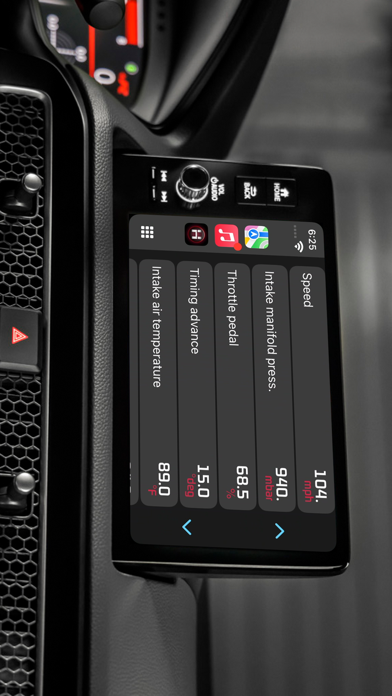
Track performance of your car in real time by gauges and graphs. Troubleshoot malfunctions by accessing the on board ECU. Know what is wrong with your car before taking it to the mechanic.Track fuel economy and save money on gas. These are just some of the features the Hondata app has to offer. Hondata app transforms your phone/tablet into an all in one performance tracking and troubleshooting tool for your car. There is a complete version of this app that includes all the addons available at a discounted price. Fautures: • Customizable gauges can track up to 80 sensors in real time including fuel economy, G-force and battery voltage. • Read and Clear trouble codes and reset MIL (service engine light). • Read from more than 40 diagnostics parameters including engine knock count, VTEC pressure and more. • Metric and Imperial measures. • CarPlay support. View sensor data on head unit. • Real-time user-defined sensor plotting. Graph up to 4 sensors at the same time on interactive graph that can be scrolled, paused and polled. • Gauge list feature can track every sensor at the same time. • Instant horsepower, mpg/kml fuel economy, boost pressure and G force tracking. • Speed limit warning: Get notified when driving over speed limit. • High coolant temperature warning gives you instant notification when your car is running too hot. • HUD mode for dashboard view : Heads up display for driving at night. • Two themes to choose from. • landscape mode for all views. Addons • Fuel Economy: - Live and average fuel economy tracking for 0-5 min, 0-30 min and 0-2 hr intervals and a detailed summary. - Long term tracking with six different intervals. (1 week, 2 weeks, 4 weeks, 13 weeks, 26 and 52 weeks). - 4 different units of measure: MPG,KPL (Km/L), L/100 Km, Miles per imperial gallon. - Interactive graph of long term data that can be cropped and scrolled through. - Export fuel history to CSV file (spreadsheets). - Other statistics: Distance travelled, average speed, money spent, CO2 produced and fuel consumed. - 4 methods of calculation available. For non MAF equipped vehicles. • Race track package: - Real time lap data, gap delay time and position in race track using high frequency GPS tracking. - Comprehensive summary of race with lap times, speed fluctuations on track and more. - Get drag racing times (0-60 mph, 0-100 mph, 1/4 mile 1/8 mile etc.) - Load and save unlimited number of tracks onto device. - Crucial racing data including real time horsepower, g-force and a detailed driving summary. Share your results with friends. - Transmission gear information and optional shifting assistant which (for manual transmission vehicles) which notifies optimal moment for shifting. - Customizable view that toggles between speed/rpm gauge, real time track positioning and G-sensor feedback. - Record your race in HD with gauge and track overlays. (dash cam add-on required) • Dashcam: Record smooth HD video with overlaying gauges (speed,rpm, etc), time, location (GPS coordinates) and G-force sensor in four different resolutions. Record from 80 sensors and up to 5 gauges. • Sensor logger: - Record up to four sensors simultaneously with 5 refresh rate options. - Save graph sensor data to CSV file and export it for further analysis. - Send real time data to a TCP socket (IP Address) over the network. *Your vehicle must be equipped with MAF sensor for instant horsepower and torque readout* *Your vehicle must be equipped with MAP sensor for boost pressure readout* Visit www.hondata.com for more info. For help: mobile@hondata.com
Screenshots(10)
View on store ↗




Ratings
4.7 / 5
1,631 ratings
- 5 ★84%
- 4 ★7%
- 3 ★3%
- 2 ★3%
- 1 ★3%
Recent Reviews
- ★★★★★Miloth3kid
1.8.4 consistent crashing
App has been great for me up until this last update. At first glance when I open the app, it had the new limit gauge features, but the gauges itself were like bugging out. Didn’t know what was wrong with it so I ended up re-downloading the app afterwards after I tried to set up my gauges The way I previously had them customized. the app just started crashing consistently after (specifically after editing digital color) sad part is I can’t even use the app anymore to monitor live feed from the engine, basically like I’m kicked off using the app anytime I try to load up the app. It just completely closes and back to home screen. (i’ve never had any issues before, and I’ve also double checked all the settings inside the flashpoint manager on a PC)
- ★★★★★Usmc1994
Needs more development
Everything on the phone is backwards like it’s in a mirror terrible application, not worth the money
- ★★★★★Nyllon66
Not working
I've had the app for about 5yrs and it always worked u til the last update now nothing always says pairing unsuccessfull
- ★★★★★PeePeeTouchr
Amazing App, Needs Improvement
I admire the color changing and gauge flexibility. you can pick whatever gauge you want if your car supports it. however, ever since I got supercharged and was tuned, the horsepower and torque gauge don’t read (they fluctuate between 1-6 values) and it’s weird. Not sure if it d a honda thing or a hondata app thing. Also withy this update, I thought it would improve bugs or fix that issue. Now i can’t read the right half of my screen because the resolution ratio must’ve became incorrect when my phone is sideways. For context I’m using an iPhone 8 for this, as it’s a phone I bought for the sole purchase of this app lol. To anyone who wants that cool flex factor, by a cheap phone and car phone holder and run this app! So I have two phones and won’t have to switch from gps to this app to monitor readings. Overal good app just needs fixes. Wish there was analytic features.
- ★★★★★Redbull808
Yes
Love The App Only Thing Mine All Of A Sudden Started Reading Backwards On My Screen Idk Why Been Trying Everything To Get It Right
- ★★★★★91 crx b16b
Great Setup
Awesome
- ★★★★★Sooloaded
Hondata s300 connection issue
My iPhone will not connect to my iPhone 13 Pro Max
- ★★★★★korkwin
Fantastic
Update: the latest patch has fixed my issue with the MPG display. I’m so happy, thank you! This app is great. I have a copy on my droid devices too. For some reason the fuel economy doesn’t display when I add it to the dashboard view, but it works fine from the sensor list or dedicated fuel economy view. This isn’t a deal breaker but it works fine on my droid devices and I really wish it worked on iOS too. I am using an iPad Mini 6.
- ★★★★★Car guy 764
Hondata
Never wants to connect
- ★★★★★4dr teg
Good app
Just doesn’t like to always connect