
TwistedWave Audio Editor
TwistedWave Software Ltd. · App ID: 401438496
Downloads / mo
912
Range 365–2.3K
Revenue / mo
$7.3K
Range $2.9K – $18.2K
RPD
$7.99
Revenue per download
Avg. DAU
4.5K
Daily actives
Time Spent
41 min
Per user / day (est.)
Session Count
310.4K
Monthly (est.)
Category Ranking
100+
Music · US Today
Top Countries
US · India · Brazil
By est. downloads share
Downloads Trend
9.5K12-mo total
Monthly avg 789.7
Revenue Trend
$75.7K12-mo total
Peak Feb ($7.4K) · amber bar = best month
Release Details
- Current Version
- 1.102
- Last Updated
- 7/1/2026
- Release Date
- 11/9/2010
- Minimum OS
- 15.6
- File Size
- 35.9 MB
- Content Rating
- 4+
- Languages
- EN, FR
Description
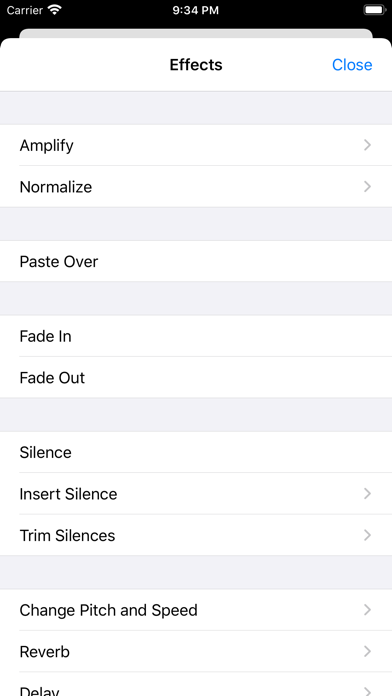
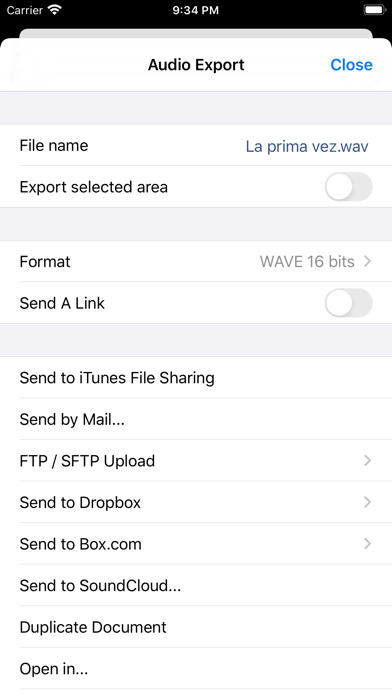
TwistedWave is a very fast and easy to use audio editor and recorder. Even when working with huge files, it will remain very fast and fluid, and will never run out of memory. UNIQUE TO TWISTEDWAVE • Very fluid, even with very large files • Unlimited undo / redo history, happens instantly RECORD AUDIO • No duration limit other than the available storage • Up to 24 bit / 96 kHz audio if your audio interface supports it • Record stereo audio with the built-in microphone (iPhone XS or more recent) • Record studio quality audio with an external microphone • Record audio from other music applications with Audiobus APPLY EFFECTS • Precision Time Stretching & Pitch Shifting technology licensed from ZTX • All the AudioUnit extensions (AUv3) available on the App Store can be used with TwistedWave • Cut, copy / paste audio around • Fade in / out • Reverb • Delay / echo • Distortion • Equalizer (parametric, or iPod EQ) • Dynamics processor, can be used as a compressor or a noise gate • Peak limiter to amplify audio without causing distortion • Amplify or normalize the audio to a given level • Filters (low-pass, high-pass, band-pass, low-shelf, high-shelf) • Convert the sampling rate (with SoX' very high quality resampler) • Reverse. Play the file backwards, mostly for fun! MANY FILE FORMATS SUPPORTED • WAV • M4A (AAC or Apple Lossless) • MP3 (Encoded with the LAME MP3 encoder for the best quality) • FLAC • AIFF • CAF MANY IMPORT OPTIONS • Import songs from the music library • Import files from the Files app • Import files from an SD card or USB drive, with the right adapter • Open files sent from other apps • Browser access, send a file to TwistedWave from a device on the same WiFi network MANY EXPORT OPTIONS • Send your files by - Email - iMessage - SoundCloud - Dropbox - AudioCopy - An FTP or SFTP account - Any app that accepts audio files • Export multiple files in a single ZIP file • Browser access to allow downloading and uploading files from/to TwistedWave • File too large? Just send a link. (30 days for free on TwistedWave's servers) BROWSER ACCESS Connect to the TwistedWave app from a web browser on another device or computer on the same WiFi network, and: • Play and download the files directly from a browser • Send files to TwistedWave by drag and dropping them in the browser
Screenshots(3)
View on store ↗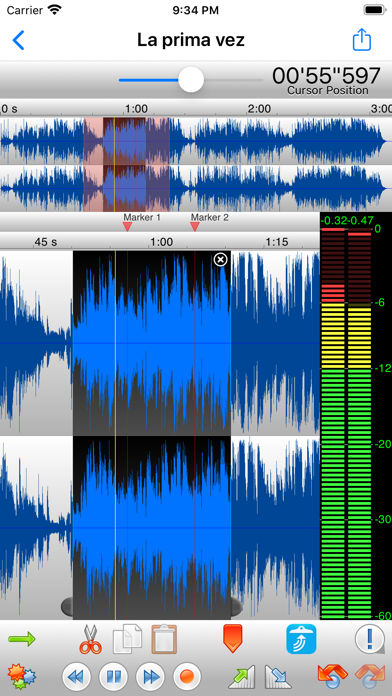
Ratings
4.8 / 5
952 ratings
- 5 ★91%
- 4 ★4%
- 3 ★2%
- 2 ★1%
- 1 ★2%
Recent Reviews
- ★★★★★رُقَيةَ
Thank you
hello There is a problem with the latest update of this wonderful app. When we share an audio file from within the app and then try to share it with another app using the Share button, the following error message appears: Error: Exporting file failed I kindly ask the development team to investigate this issue and fix it in the next update, as it prevents audio files from being shared with other applications. Thank you for your continued efforts. We hope this issue will be resolved soon.
- ★★★★★egoki11a
Love the new icon!!!
Woot!
- ★★★★★joe_smooth
Poor Support on iPad OS
Why is there no manual for TwistedWave on ipad? Also why can i no longer see the “Denoise” functionality on the iPad app. I want my money back.
- ★★★★★almjrn
Problem in echo
Problem in echo
- ★★★★★JB Tipton
No Documentation
I've been all over the internet trying to find a manual for the ios version of Twisted Wave. No luck. Ios version very different from desktop version but no explanation for how to use it exists anywhere. There is what looks like a volume slider at the top of the recording window. What is it for? It has no effect on input level. How do you select regions? How does one use the buttons at the bottom of the record window? Lack of ANY documentation makes it impossible to use this app for anything other that quick recording.
- ★★★★★JBĞ
The Best Audio Editor You’ll Find on iOS
This app is amazing. I was looking for something to compete with Audacity on-the-go, and this app fits the bill perfectly. The app is extremely stable & feature-rich. It has all the essentials you’d expect, can handle small and MASSIVE audio lengths alike, NEVER crashes, in-depth edit history… the list goes on. And the best part? No in-app purchases! No upselling! Constant updates and bug fixes! More developers should strive to make great paid apps as good as TwistedWave. This app should be more popular.
- ★★★★★mianmeli
Great lightweight app
I love this app, it’s so easy to use on iPhone. I use this to edit our church services. I record on a usb stick plugged in to our X32, then I plug the usb into my iPhone and I can edit the audio anytime I want. It can edit 2 hour+ files with ease. 6 stars!
- ★★★★★Cowgirl wife
Podcast and radio program use
I have used this program for 10 of the twelve years that I have been doing daily recordings. I love how simple it is to use. I have no skills but I can edit with it. I appreciate the quality of the recordings. Thirdly but probably the best is customer service. I have only had two issues in the ten years. Thomas has gotten back to me in a timely fashion and able to fix my problem. Highly recommend this app for your recording needs.
- ★★★★★syscheckin
iOS Audacity
If you casually or professionally edit audio, this is for you.
- ★★★★★Isaac1315
My most favorite editor just got better
I’ve been using this app for a while and with every update it just gets better and better the easiest way to edit audio files Thank you for the this fantastic app. I hope one day it will have the option of cleaning out background noise