
Blackmagic Camera
Blackmagic Design Inc · App ID: 6449580241
Downloads / mo
108.3K
Range 43.3K–270.8K
Revenue / mo
$195K
Range $78K – $487.5K
RPD
$1.80
Revenue per download
Avg. DAU
85.3K
Daily actives
Time Spent
11 min
Per user / day (est.)
Session Count
5.9M
Monthly (est.)
Category Ranking
#28
Photo & Video · Downloads
Top Countries
US · India · Brazil
By est. downloads share
Downloads Trend
1.1M12-mo total
Monthly avg 93.6K
Revenue Trend
$2M12-mo total
Peak Feb ($195.5K) · amber bar = best month
Release Details
- Current Version
- 3.3.1
- Last Updated
- 4/18/2026
- Release Date
- 9/14/2023
- Minimum OS
- 17.0
- File Size
- 190.9 MB
- Content Rating
- 4+
- Languages
- EN, FR, DE, IT, JA, KO +3
Description
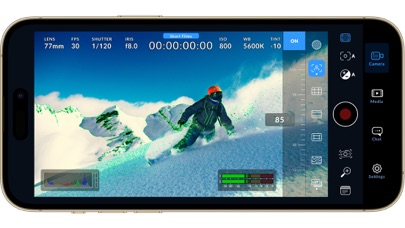
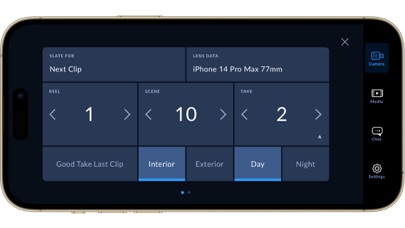
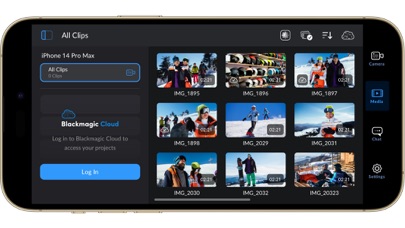
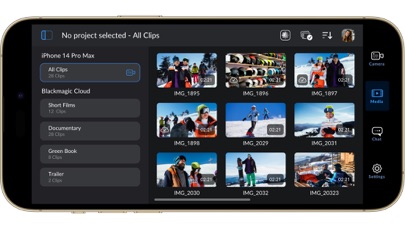
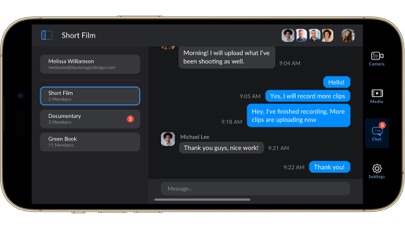
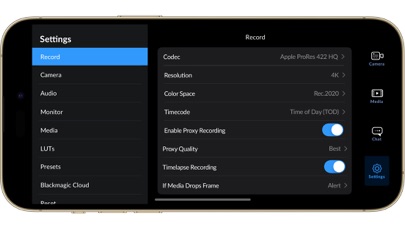
Introducing Digital Film for iPhone and iPad! Blackmagic Camera unlocks the power of your iPhone and iPad by adding digital film camera controls and operating systems! Now you can create the same cinematic ‘look’ as Hollywood feature films. You get the same intuitive and user friendly interface as Blackmagic Design’s award winning cameras. So it’s just like using a professional digital film camera! This means you can adjust settings such as frame rate, shutter angle, white balance and ISO all in a single tap. Or record directly to Blackmagic Cloud in industry standard 10-bit Apple ProRes files up to 4K! Recording to Blackmagic Cloud Storage lets you collaborate on DaVinci Resolve projects with editors anywhere in the world, all at the same time! Get the "Hollywood Look" with Digital Film! Blackmagic Camera puts the professional features you need for feature film, television and documentaries in your pocket. Now you can create YouTube and TikTok content with a cinematic look, and broadcast quality ENG! Imagine having a run and gun camera on hand to capture breaking news whenever it happens! Or use Blackmagic Camera as a B Cam to capture angles that are difficult to reach with traditional cameras, while still retaining control of important settings. Best of all, recording to Blackmagic Cloud allows you to get your footage to the newsroom or post production studio in minutes. Interactive Controls for Fast Setup Blackmagic Camera has all the controls you need to quickly setup and start shooting! Everything is interactive, so you can tap any item and instantly change settings without searching through confusing menus! The HUD shows status and record parameters, histogram, focus peaking indicators, levels, frame guides and more. Show or hide the HUD by swiping up or down. You can auto focus by tapping the screen in the area you want to focus. You can shoot in 16:9 or vertical aspect ratios, plus you can shoot 16:9 while holding your phone vertically if you want to shoot unobtrusively. On Screen Heads Up Display The heads up display, or HUD, controls have the most important camera controls such as lens selection, frame rate, shutter angle, timecode, ISO, white balance, gain and audio levels. You can adjust settings such as exposure by touching the ISO indicator, or you can change the audio levels simply by touching the audio meters. Everything is interactive, so if you tap any item you can instantaneously change its settings without having to search through complex menus! Camera Setup Menus The settings tab unlocks the full power of your phone’s camera, with quick access to advanced settings such as monitoring, audio, camera setup, recording and more! The record tab gives you total control over video resolution and recording format including industry standard Apple ProRes or space efficient H.264 and H.265. Plus, you can set anamorphic de-squeeze and lens correction settings. Professional audio options include AAC and PCM format and VU or PPM audio metering. You can even add external microphones! Or add 3D LUTs to recreate film looks! Media The Blackmagic Camera media tab has all the controls you need to browse or scrub clips for quick review, search and sort and view the upload status of your media. Access your media from Blackmagic Camera’s all clips folder by choosing the Media button to see the thumbnails for each clip you have stored. Plus, you can save to the files folder on the phone, send it to Blackmagic Cloud Storage via Blackmagic Cloud or manually choose which clips to upload to a project library. You can even sync media from Blackmagic Camera directly into the DaVinci Resolve project so you’re ready to edit! Live Sync to Blackmagic Cloud Storage When shooting with Blackmagic Camera, the video you capture can be instantly uploaded as a proxy file, followed by the camera originals, and saved to Blackmagic Cloud Storage. This means you can start editing quickly using your proxies, speeding up your workflow.
Screenshots(10)
View on store ↗



Ratings
4.8 / 5
20,315 ratings
- 5 ★89%
- 4 ★5%
- 3 ★2%
- 2 ★2%
- 1 ★2%
Recent Reviews
- ★★★★★Ralph.jr1
Excelente app
Solo le faltaría tomar fotos que me imagino que es bajo modalidad de pago
- ★★★★★the real king julian
Volume Levels Need gain control for Phone Mic
The iPhone app doesn’t have a gain control except for when you have an external mic plugged in. And what happens is your iPhone mic gain will be all the way up with no control. Would like to see a future update with a pro volume audio control for any mic whether built in or external.
- ★★★★★SamuelAsterisk
Good, but they gotta fix the measuring storage issue
Overall this app is really good! Gets past the trashy Apple over sharpening, does its use really well overall. But it measures your available storage just completely and totally wrong! It says I have approximately 0.22 of storage left, when in fact I have at least 3gb of space left, at the least! Anyways, good app with some major bugs.
- ★★★★★a.neallyo
Needs to Support Atomos Time Code
Can’t use this app because it doesn’t support my Atomos time code unit. Not a fan of the options this app does support.
- ★★★★★sdaplfan
Free open gate
That’s extraordinary!
- ★★★★★Fuhatreza
Great App
Best for filmmaking
- ★★★★★Ratoman AR
Awesome
Thank you for this app Synchronizing phones recording is a bliss!!!!!
- ★★★★★Chris4259
Black magic camera is the best I ever seen!!
I love this app more than any other app, period!!!!
- ★★★★★Reviewwww for black magic cam
Review
This has helped us so much with our filming!! We are eternally grateful!!!
- ★★★★★Sun Maximus
Simple and complex at the same time!
I really enjoy this app because it allows you to study filmmaking at a much deeper level in practice. Features like framing guides, audio meters, the ability to switch between stereo and mono audio, black-and-white monitoring, different camera looks, and shutter angle controls make it feel much more like a true cinema camera than a typical smartphone app. Coming from a still photography background, I was initially locked into thinking in terms of fixed f-stops and traditional photographic settings. One of the things I appreciate most about this app is the shutter angle control. It introduces a more cinematic way of thinking about motion and exposure. Being able to work with settings such as 180° and 360° shutter angles helps you understand how motion is captured and gives you much finer creative control than traditional photography settings. This app really bridges the gap between photography and filmmaking. It teaches concepts that are fundamental to cinema production and helps users develop a deeper understanding of motion picture cameras. I’ve also become interested in Blackmagic Design’s hardware because of this experience. I’m considering purchasing a Blackmagic Pocket Cinema Camera 6K. Even their more affordable and older models offer advanced recording formats with less compression and more film-friendly codecs than many consumer cameras. Those features make them excellent tools for learning real cinema production and professional post-production workflows. Overall, I love this app. It has given me a much better understanding of filmmaking and has made cinema cameras feel more accessible. I’m also interested in exploring wireless lens control, although I still need to decide whether I prefer a wired solution since Bluetooth can occasionally introduce reliability concerns in professional environments.